Description
Affordable live mixer with 4 HDMI inputs with standards conversion, USB webcam output, audio mixer with EQ and dynamics, 2D DVE, transitions, color keyer on green background, 20 still images for titles and more! ATEM Mini Pro also offers USB disk recording in H.264 format, built-in streaming functionality for YouTube Live, Facebook, Twitch and more, as well as a multi view to display the signal from all cameras on one. monitor. In addition, this model offers a recording of 5 streams, including a clean feed on all inputs for editing, as well as a DaVinci project file for quick editing and link to the Blackmagic RAW file for finishing in Ultra HD.
Experience live multicamera production with advanced broadcast features.
ATEM Mini mixers make it easy to create professional multi-camera productions for live streaming on YouTube and for innovative presentations on Skype or Zoom. Just connect the ATEM Mini to switch up to 8 video camera inputs and get superb quality images. You can also connect a computer for PowerPoint slides or game consoles. The built-in DVE allows you to create stunning picture-in-picture effects, which is ideal for commenting. It also offers many video effects. Since all ATEM Mini models have a USB connector that functions as a webcam, you can use any streaming software. The ATEM Mini Pro and ATEM Mini Extreme models also allow live streaming of your content and record to USB disks. ATEM Mini even has broadcast features for your high-end projects.
Optimized video production and live streaming
Live production is the fastest way to share your programming. Plus, you can simultaneously stream them live across the world via YouTube. The USB webcam output works with all streaming software. In addition, the Pro and Extreme models allow you to stream directly over the Internet on social media platforms. Thanks to the HDMI inputs, eight in number depending on the model, you can shoot multiple angles of view, for example wide and close-up. You can then connect a computer for PowerPoint slides or game consoles. Since all switching is done in real time, you can stream your content live to YouTube, Facebook, TwitchTV or other platforms.
Stand-alone broadcast-quality mixer
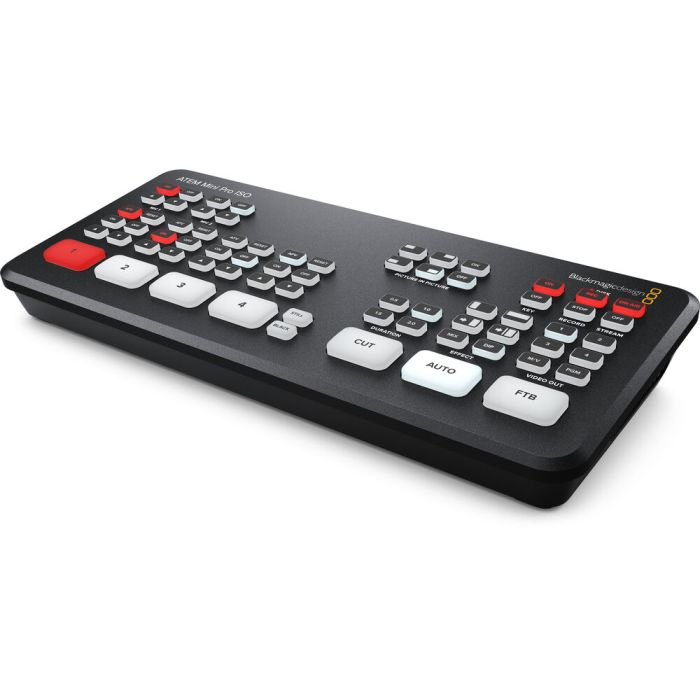
The ATEM Mini's compact all-in-one design includes a control panel as well as connections. The front panel includes easy-to-use buttons for source selection, as well as various video effects and transitions. As the dedicated source buttons are large, they are recognizable by touch and allow the presenter to easily switch. You also have buttons for audio mixing. On the ATEM Mini Pro and Extreme models, you will find buttons for recording and streaming, as well as for selecting outputs. These are used to send the video output signal to the cameras, the program and the multi view. On the back of the panel you'll find HDMI connections for cameras and computers, additional mic inputs, a USB webcam output, as well as an HDMI "aux" output for program video.
Intuitive and easy to use
The ATEM Mini is very easy to use, as you only need to press one of the numbered input buttons on the front panel to switch between video sources. You can choose between Cut transitions or Effects by selecting the Cut or Auto button. Unlike the Cut button, the Auto button applies a video effect when switching inputs. You can choose from the most popular transitions like crossfade, or more dramatic effects like Dip to Color, DVE squeeze, and DVE push. Add a DVE effect to it, such as a picture in picture with a custom position and background. There are even media players that act as a library for titles and graphics, which you can load via external control software.
Live interview streaming
The ATEM Mini is a suitable tool for interviews, as several cameras can be connected to it. Thus, it is possible to take close-ups of the presenter and the speakers, as well as wide shots. In addition, the ATEM Mini is so compact that it can be used in small studios. In addition, ATEM Mini Pro and Extreme models support live streaming to YouTube, Facebook and others.
Business presentations via Skype
Your presentations will soon be of better quality thanks to the ATEM Mini's webcam output! Connect a camera for a close-up, another for a wide shot, and a computer for your PowerPoint presentations. The presenter can even use a picture-in-picture effect.
Live streaming of eSport competitions
To stream eSports competitions live on Twitch, simply connect multiple game consoles and a camera to film the presenter. The ATEM Mini operates at 60 frames per second, providing fast-paced gameplay. Plus, you can use the picture-in-picture effect for comments! It is also possible to download titles directly from Photoshop.
Kickstarter and presentations for investors
Finance your new products with professional presentations to investors or on Kickstarter. To do this, connect a camera for the presenter, another for the close-ups of the product and a computer to scroll through the slides of your business plan. Then you can choose to stream your presentation live via Skype or Zoom, or post it for investors to view later.
Education and formation
ATEM is perfect for instructional videos. As its setup is quick and easy, you can travel and record multi-camera live productions on any subject you want! Connect computers and cameras, and use the ATEM Software Panel to load titles and perform video effects.
Connect up to 8 independent cameras
Thanks to its 4 or 8 HDMI inputs depending on the model, you can connect several cameras to have different viewing angles. The quality of video cameras with HDMI outputs is better than that of simple webcams. This is because the cameras have higher quality lenses and greater sensitivity in low light. In addition, all video sources synchronize with the switcher when their video standard differs. So you will no longer have to worry about connecting your video devices. Since the lenses of cameras with HDMI connections are often interchangeable, you can use prime lenses for wide shots, and zoom lenses for close-ups. They can now use high-performance low-light cameras for theatrical productions, weddings, school concerts and music videos.
HDMI and USB video output for the webcam
For optimal compatibility, all ATEM Mini models have a USB connection that functions as a simple webcam. So you can connect a computer and work with the video software of your choice. The software will recognize the ATEM Mini as a webcam, while you will have a real live production mixer! This ensures full compatibility with all software in full HD 1080 resolution. Choose software, such as Zoom, Microsoft Teams, or Skype, and create presentations in multicamera broadcast quality. The ATEM Mini's webcam output also works with Open Broadcaster, XSplit Broadcaster and other streaming software.
Live streaming via Ethernet from ATEM Mini Pro
The ATEM Mini Pro and ATEM Mini Extreme models include built-in streaming functionality for live streaming through their Ethernet connection. So you can stream your content live on YouTube, Facebook and Twitch in optimized quality, without frame loss, and with simplified settings. Just select the streaming service and enter the stream key. ATEM Software Control includes palettes for streaming settings. In addition, the streaming status is also displayed on the multi view. It's easy to understand because the data rate indicator displays the internet speed required for the video format you are using. The more experienced can also modify the streaming profiles in an XML file to load new services.
Connect 4G or 5G phones to use mobile data
If you are doing live production on site, the ATEM Mini Pro and Extreme models support connecting to an Apple or Android phone through the USB port to use your mobile data. It is also an excellent backup for the main Ethernet connection. The device is compatible with the latest 5G phones, as well as the most popular 4G ones! The ATEM switcher will automatically detect when a phone is plugged in and switch the internet connection to it. This will prevent you from having to change any settings. Once connected, the phone will be powered through the USB port. It will thus load from the mixer. By plugging them into a phone and using mobile data, ATEM Mini Pro and ATEM Mini Extreme become ideal mobile production solutions!
Record to USB flash disks with the ATEM Mini Pro
The ATEM Mini Pro and Extreme models also support recording streaming media to USB flash drives. So you can make very long recordings of the same H.264 video files with AAC audio used for streaming, then upload them directly to any online video site, like YouTube or Vimeo. Multi-disc recording is also supported with a USB hub or Blackmagic MultiDock. So when one disc is full, recording continues on the second. Recording settings and disc selection are made from ATEM Software Control and recording status is displayed on the built-in multi view. You can even trigger recording on connected Blackmagic Pocket Cinema Cameras.
ATEM Mini Pro ISO
This model includes all the features of the ATEM Mini Pro, and can record 5 H.264 video streams in real time. This represents a clean feed of all inputs besides the live program. A DaVinci Resolve project is also saved so you can adjust cuts, remix audio, and perform color correction.
Edit live productions with ISO recordings!
The ATEM Mini Pro ISO and Extreme ISO models allow you to edit live events, as they can record multiple video streams, including clean feeds from all inputs and the program, all simultaneously. The images in the media library are also backed up with the video files. Video files include metadata, such as synchronized timecode and camera numbers. Imagine being able to wind up your program with new calibrations, effects and graphics! In addition, the audio sources are recorded so that you can professionally remix the sound.
Edit live productions in DaVinci Resolve
ISO templates can also save a DaVinci Resolve project file so you can open your live production as a video edit with just one click. All cuts, crossfades and graphics from the media library will be loaded. This makes it possible to fine-tune edit points and even replace clips. The DaVinci Resolve Sync Bin allows you to select new clips via a multi view, so it is very easy to use. You can even link Blackmagic RAW files from cameras to add professional color corrections and finish the project in Ultra HD!
Add beautiful video effects
ATEM Mini also lets you create professional productions with built-in video effects! With the Cut button, you can make instant cut transitions when switching between sources. The Auto button is typically used on large mixers to activate transitions with video effects. You can set the duration of video effects between 0.5, 1, 1.5 and 2 seconds. You can select the type of effect you want to include, such as Mix which offers a quick transition between sources, or the Dip effect which fades in through a color during the transition. Or, use more fun DVE effects, which move the image off-screen as you transition between sources.
Connect professional microphones
Thanks to its two independent 3.5mm stereo audio inputs, you can connect desktop microphones and lapel microphones. You can even connect an audio player to generate introductory music after the live streaming has started, but before the program launches. With 2 additional stereo audio inputs, both presenter and guest can carry a lavalier microphone. All audio inputs to the ATEM Mini include buttons on the panel to adjust the audio level and activate the inputs in the audio mixer. All models also incorporate a Fairlight audio mixer. The HDMI audio inputs and the two microphone inputs are connected to the audio mixer to be able to mix live all audio sources. The ATEM Mini Extreme also includes a headphone output.
Automatically convert HDMI input format
The HDMI inputs each have their own standards converter. Thus, the ATEM Mini automatically converts 1080p, 1080i and 720p sources to the video standard of the switcher. By default, the mixer will automatically configure its video format. The HDMI outputs are true auxiliary outputs. It is therefore possible to switch each of the HDMI inputs to the output. You can even switch input 1 directly to the HDMI output for low latency for esports. Additionally, ATEM Mini Extreme models support 2 low latency loops. On the more powerful ATEM Mini Pro and ATEM Mini Extreme models, the HDMI output can be assigned to multi view.
Secret broadcast functions
Although the ATEM Mini is easy to use, it contains very powerful broadcast functions! If a career in the television industry appeals to you, the ATEM Mini is an ideal training tool, as it offers the same functionality as high-end broadcast studio mixers. You get an advanced ATEM chroma keyer, Fairlight audio mixer, DVE, graphics library and more. Simply install the free ATEM Software Control software on a Mac or Windows computer and connect the ATEM Mini via USB or Ethernet to access all of its features. With a little practice, you can learn how to make broadcast quality live productions. The ATEM Mini is a true broadcast mixer concealed in a small, affordable housing!
ATEM software control panel included for free
ATEM Software Control unlocks the full power of the ATEM Mini and provides full access to the mixer functionality. Its intuitive interface displays mixer settings and palettes for quick adjustments. Although it usually connects via USB, it can also be plugged in via Ethernet to connect multiple users to the ATEM Mini from different computers. With this software, you can mix audio with effects, load still images, and even program advanced macros. It is also possible to save the mixer state as an XML file. Additionally, if you need to play back clips, you can control HyperDeck disk recorders over Ethernet.
DVE for picture-in-picture effects and transitions
One of the most exciting features of the ATEM Mini is the HD Digital Video Effects Processor, or DVE, which enables picture-in-picture effects and DVE transitions. With DVE, you can create professional picture-in-picture effects with configurable 3D borders, shadows and lights. This gives you the same picture quality as on top-of-the-line ATEM switcher models. The DVE allows you to position, resize and scale your content in real time. You can also achieve stunning DVE transitions with 16 squeeze and push effects to make your programs even more alive. In addition, the DVE incorporates the “fly key” function to create Graphic Wipe transitions with custom graphics.
Professional broadcast transitions
ATEM Mini includes a wide range of native HD broadcast quality transitions, such as Mix, Dip and Wipe. All transitions can be customized by adjusting duration, border color, border width, position and direction. You can also use the DVE for Graphic Wipe transitions, often used in sports broadcasts, where a graphic moves with the wipe. To prevent errors, ATEM Mini has built-in transition preview functionality that lets you check your transitions before playing them on the air.
Graphics integrated with Photoshop plug-in
The integrated media library can load up to 20 broadcast-quality RGBA graphics for titles and logos. The media player allows the selected image to be routed so that it appears as an additional internal video source for use with graphics and titles. You can also use still images for complex effects, such as Graphic Wipes. With the ATEM Mini it is also possible to transfer still images from the output video to the internal media library. Graphics can be loaded through ATEM Software Control or downloaded directly from Photoshop using ATEM's Photoshop plug-in. The Photoshop plug-in is perfect for graphics that change often, like scoreboards, because you can load them directly into the media player.
Incorporates the new advanced ATEM chroma keyer
The ATEM Mini is ideal for newsletters or on-set programs, as it has an advanced ATEM chroma keyer for green screen inlays. In addition to being incredibly powerful, the ATEM Chroma Keyer includes a color picker to sample background colors and automatically generate key settings. You get fine controls for borders and highlights, as well as a foreground color corrector to match the foreground layer to that of the background, for compositions impeccable. You can even use it to add titles by creating graphics with a green or blue background. In addition, the ATEM Mini Extreme includes 4 advanced ATEM chroma keyers, one keyer per camera for virtual sets with fixed cameras.
A powerful SuperSource processor!
In addition to the 2 independent DVEs of the ATEM Mini Extreme models, you also get a powerful multi-layered SuperSource processor with 4 DVE layers and a background layer that appear as an additional input source. Any video input from the ATEM Mini Extreme can be used for each DVE SuperSource. This is then overlaid on top of a custom media library background. The SuperSource function is ideal for achieving multiple picture-in-picture effects, such as for interviews, as you can adjust the effect before going on air, while keeping the main DVEs free for other tasks . Thanks to the SuperSource function, it's like having an additional mixer for multi-layered visual effects.
True broadcast M / E switching
Although the ATEM Mini operates in "Cut bus" mode upon purchase, you can also choose to use "Program / Preview" mode, the most popular mode of operation for live production. Cut bus type switching is easy, as any selected input is instantly broadcast to the air. However, if you want to operate the ATEM Mini professionally, choose Program / Preview mode using ATEM Software Control software. The Mix Effects mode of operation allows you to select a source that will not come on air unless you press the Cut or Auto button. This two-step Program / Preview process helps minimize errors. It is ideal for students preparing for a career in broadcast.
Source and status monitoring with the ATEM Mini Pro multi view
For larger multi-camera productions, it is very useful to be able to view all of your video sources at the same time on a single monitor. The ATEM Mini Pro and ATEM Mini Extreme models include professional multi view that lets you see your 4 video inputs, as well as preview and schedule on a single HDMI monitor or TV. Just press M / V on the front panel to select multi view. Each camera view includes tally lights to tell which source is on air, as well as custom labels and audio indicators. In addition, the ATEM Mini Extreme models allow you to select up to 16 custom views. Multi view even displays recording, streaming, and audio mixer status.
Connections
Total Video Inputs
4
Total Outputs
2
Total Aux Outputs
1
Total Audio Inputs
2 x 3.5mm stereo mini jack.
Total Audio Outputs
None, embedded audio only.
Timecode Connection
None
HDMI Video Inputs
4 x HDMI type A, 10-bit HD switchable.
2 channel embedded audio.
Video Input Re-Sync
On all 4 HDMI inputs.
Frame Rate and Format Converters
On all 4 HDMI inputs.
HDMI Program Outputs
1
Ethernet
Ethernet supports 10/100/1000 BaseT for live streaming, software control, software updates and direct or network panel connection.
Computer Interface
1 x USB Type-C 3.1 Gen 1 for external drive recording, webcam out, software control, software updates and panel connection.
Standards
HD Video Input Standards
720p50, 720p59.94, 720p60
1080p23.98, 1080p24, 1080p25, 1080p29.97, 1080p30, 1080p50, 1080p59.94, 1080p60
1080i50, 1080i59.94, 1080i60
HD Video Output Standards
1080p23.98, 1080p24, 1080p25, 1080p29.97, 1080p30, 1080p50, 1080p59.94, 1080p60
Video Streaming Standards
1080p23.98, 1080p24, 1080p25, 1080p29.97, 1080p30, 1080p50, 1080p59.94, 1080p60
Ultra HD Video Standards
None
Video Sampling
4:2:2 YUV
Color Precision
10-bit
Color Space
Rec 709
HDMI Input Resolutions from Computers
1280 x 720p 50Hz, 59.94Hz and 60Hz
1920 x 1080p 23.98, 24, 25, 29.97, 30, 50, 59.94 and 60Hz
1920 x 1080i 50, 59.94Hz and 60Hz
Colorspace Conversion
Hardware based real time.
Product Specifics
Upstream Keyers
1
Downstream Keyers
1
Advanced Chroma Keyers
1
Linear/Luma Keyers
2
Transition Keyer
DVE only.
Total Number of Layers
5
Pattern Generators
1
Color Generators
2
DVE with Borders and Drop Shadow
1
Interface
Minimum monitor resolution of 1366 x 768.
Audio
Audio Mixer
6 input x 2 channel mixer.
Selectable On/Off/Audio-Follow-Video per channel plus separate gain control per channel.
Level and Peak metering. Plus new Fairlight audio enhancements: Compressor, Gate, Limiter, 6 bands of parametric EQ. Master gain control.
Analog Input
Unbalanced stereo
Analog Input Delay
Up to 8 frames
Input Impedance
1.8k
Max Input Level
+6dBV
Mic Plug In Power
Available on both 3.5mm mini jack connections.
Streaming
Direct Streaming
ATEM Mini Pro ISO supports direct live streaming using Real Time Messaging Protocol (RTMP) over ethernet or a shared mobile internet connection over USB‑C.
Recording
Direct Recording Video and Audio
USB-C 3.1 Gen 1 expansion port can record directly to external media.
Video Recording
4 x HDMI ISO inputs as H.264 .mp4 files at up to 70Mb/s quality at the ATEM video standard with AAC audio.
1 x Program out as H.264 .mp4 file at the Streaming quality setting and at the ATEM video standard with AAC audio.
Audio Recording
6 x 2 channel audio inputs recorded as seperate 24‑bit 48KHz .wav files. Including 2 x analog stereo audio inputs and 4 x HDMI 2 channel embedded audio inputs.
Switching
Program switching recorded as a DaVinci Resolve project .drp file.
Media Format
Supports media formatted ExFAT (Windows/Mac) or HFS+ (Mac) file system.
Multi View Monitoring
Multi View Monitoring
1 x 10 Views including left right configurable Program/Preview, 4 HDMI inputs, Media Player, Streaming Status, Recording Status and Audio Meters.
Multi View Video Standard
HD
Media Player
Media Players
1
Channels
Fill and key for each Media Player.
Media Pool Still Image Capacity
20 with fill and key.
Media Pool Still Image Format
PNG, TGA, BMP, GIF, JPEG and TIFF.
Control
Control Panel
Built in control panel. Software control panel with camera control included. Supports optional hardware panel.
Control Panel Connection
Ethernet supports 10/100/1000 BaseT. Ethernet used for direct connection between panel and chassis or via network. ATEM Mini Pro ISO also supports direct USB‑C connection. Ethernet or USB‑C used for updating the software.
Control Panel Compatibility
Includes ATEM Software Control Panel. Also compatible with ATEM 1 M/E Advanced Panel, ATEM 2 M/E Advanced Panel and ATEM 4 M/E Advanced Panel. ATEM Mini Pro ISO can be configured using Blackmagic Videohub Hardware Panel Setup utility to route sources to destinations using Videohub Smart Control Pro and Videohub Master Control Pro.
Control Panel Included
ATEM Software Control Panel included free for Mac 10.14 Mojave, Mac 10.15 Catalina or later and Windows 10 64 bit only.
Software
Software Updates
Using USB or Ethernet connection directly connected to Mac OS X or Windows computers. Includes ATEM Switcher Utility.
Configuration
Set via ATEM Software Control Panel, excluding ATEM chassis IP address which is set via the ATEM Switcher Utility connected via USB to chassis.
Operating Systems

Mac 10.14 Mojave,
Mac 10.15 Catalina or later.

Windows 10, 64-bit.
Power Requirements
Power Supply
1 x External 12V power supply.
Power Usage
36W
Environmental Specifications
Operating Temperature
5° C to 40° C (41° - 104° F)
Storage Temperature
-10° to 60° C (14° to 140° F)
Relative Humidity
0% to 90% non-condensing
What's Included
ATEM Mini Pro ISO
External 12V DC power supply with international socket adapters